Every developer blog needs a post about how it was built. So here’s mine.
The requirements
I wanted something simple:
- Fast — static HTML, no JavaScript framework overhead
- Cheap — under £2/month
- Automated — push to
main, site updates - Maintainable — infrastructure as code, not click-ops
- Mine — custom domain, full control
The architecture
For my portfolio website I wanted something that I had 101% control over. Not only that I also wanted the website itself to be a technical showcase of all the fun cloud things I learned during my role at Sigma Labs.
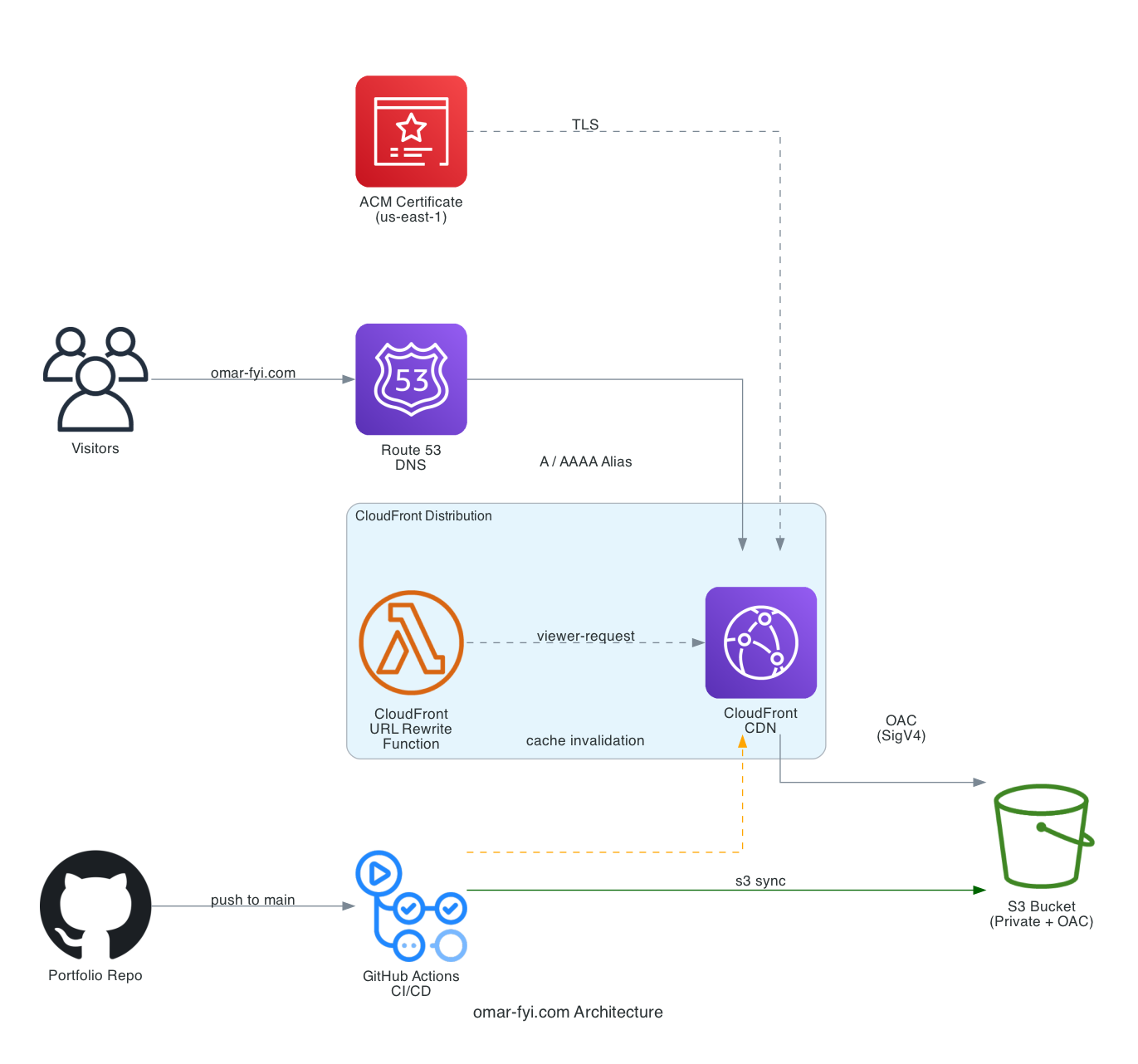
That’s when I arrived at the current architecture you see above. In essence, my site is a github repository I keep updated with all my portfolio posts (yes even this one right here). The larger content such as images and videos are not sent to the remote repo. This content lives on a frontend/public/media folder which gets synced to the remote S3 bucket anytime I run ./sync_media_files_to_site.sh.
As a programmer I find this system easier than signing up for something like squarespace or wix. Although their GUI is made to be intuitive I often find it more finnicky than pleasing to use. This system makes use of the technologies I know off and it’s easy for me to maintain over time. Emphasis on this being easier for me.
Theres a lot of frameworks I used in order to make my life a little bit easier such as:
-
Terraform: Just in case the warehouse hosting my server burns to ash, I can set my whole website again using literally just one command ‘terraform apply’.
-
Github actions: Because I’m too lazy to manually deploy the site every time I am missing a comma.
-
Astro: It’s a pretty solid framework to make static html that’s is lightweight enough to cheaply host on AWS.
-
Openclaw: This was an AI agent I deployed locally on my computer. It’s solely responsible for creating the the bulk of the site. It was magical how well it worked and how much it taught me along the way 😁!
-
Kiro: This was another agentic coding tool I learned after OpenClaw. Both this and Openclaw will be covered in their own posts but essentially this is just another tool that helps me maintain the site and enhance my overall productivity 😁!
-
Cloudfront static hosting + S3: Because this is literally having a server host a few static files from a bucket where data storage is functionally free at this scale. Not just that the servers where the files are hosted are edge servers meant to deliver static html ASAP to your hungry eyes!
And many more technologies that are explained in excruciating detail on my github repo and later on this post. Enjoy!
This is the part where you STOP READING because I am about to ramble a whole book about the technologies used in this site. So unless you are a massive nerd and are not particularly pressed for time… I dunno go away.
The stack
Astro for the frontend
Astro is a static site generator that ships zero JavaScript by default. You write components, it outputs plain HTML and CSS. Perfect for a content site.
The killer feature is content collections. You define a schema for your blog posts, and Astro validates your frontmatter at build time. Type-safe markdown:
const blog = defineCollection({
  type: "content",
  schema: z.object({
    title: z.string(),
    description: z.string(),
    pubDate: z.coerce.date(),
    thumbnail: z.string().optional(), // listing page thumbnail
    tags: z.array(z.string()).default([]),
    draft: z.boolean().default(false),
  }),
});
No runtime, no hydration, no bundle size anxiety. Just HTML.
S3 + CloudFront for hosting
The built site is a folder of static files. S3 stores them, CloudFront serves them globally with edge caching. The setup:
- S3 bucket — private, no public access. Files are only accessible through CloudFront using Origin Access Control (OAC)
- CloudFront — HTTPS everywhere, HTTP redirects, Brotli/gzip compression, custom error pages
- Route53 — DNS management, A/AAAA records aliased to the CloudFront distribution
- ACM — free TLS certificate with automatic renewal
The total monthly cost:
| Service | Cost |
|---|---|
| S3 storage | ~£0.01 (a few MB of HTML) |
| CloudFront | Free tier covers 1TB/month for the first year |
| Route53 | £0.40/hosted zone |
| ACM | Free |
| Total | ~£1-2/month |
Terraform for infrastructure
Every AWS resource is defined in Terraform. No clicking through the console. The infrastructure is split into modules:
terraform/
  modules/
    s3/          # Bucket, policy, encryption
    cloudfront/  # Distribution, OAC, caching
    acm/         # TLS certificate
    route53/     # DNS records
Want to tear it all down? terraform destroy. Want to see what would change? terraform plan. Want to recreate it identically in another account? terraform apply.
Terraform is one of those tools that feels slow at first but later down the line you simply cannot do without because of how many headaches it’ll save you.
GitHub Actions for CI/CD
Two workflows:
- Deploy — triggered on push to
mainwhen frontend files change. Builds the Astro site, syncs to S3, invalidates the CloudFront cache. - Terraform — triggered on push to
mainwhen Terraform files change. Runsfmt,validate,plan, andapply.
The deploy step is three commands:
npm run build
aws s3 sync dist/ s3://$BUCKET --delete
aws cloudfront create-invalidation \
  --distribution-id $DIST_ID \
  --paths "/*"
Push, wait about 90 seconds, site is live.
What I’d add next
- RSS feed — Astro makes this straightforward
- Dark/light toggle — currently follows system preference, might add a manual switch
- Search — probably Pagefind, which builds a search index at compile time
- Analytics — something privacy-respecting like Plausible or Umami
But for now, this works. Simple, fast, cheap, automated. Exactly what I wanted.